Mino: hackable smart robot
Mino is the expressive mobile robot built to help you bring your ideas to life.
Designed for developers
Mino is a fast, flexible foundation for your next smart robotics project. Develop your robot apps on an open-source software stack with ready-to-integrate capabilities, tools to create your own, and access to the vast robot software ecosystem of the Robot Operating System 2 (ROS 2).
Mino is not a toy, Mino is a tool for innovation. Just connect to the robot from your IDE and start creating!
Experiment with on-robot AI
Mino can carry an NVIDIA Jetson Orin Nano Super Developer Kit running Linux.
Its up to 67 TOPS and 8 GB of memory allow you to run cutting-edge AI models on the robot without the network latency, privacy concerns and recurrent fees of cloud APIs.
The audio and images from you and your family don't need to end up in some company's servers for the robot to work.
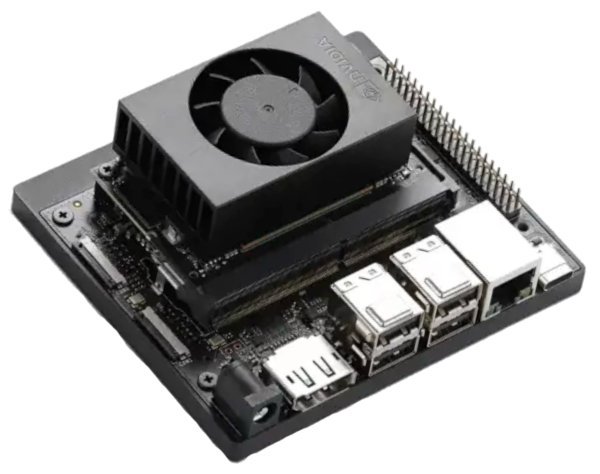
- ModuleThe Jetson System-on-Module (SoM) — the compute chip package itself, without a carrier board.NVIDIA Jetson Orin Nano
- BoardThe carrier board the module plugs into, providing the ports and connectors Mino uses.NVIDIA Jetson Orin Nano Super Developer Kit
- Max. AI performance67 TOPS
- Memory capacity8 GB
- Max. memory bandwidth102 GB/s
- ARM cores6
- Max. CPU frequency1.7 GHz
- Max. power consumptionThe maximum power consumption of the Jetson board under full compute load. It does not include the consumption of connected peripherals or the rest of the robot (motors, servos, sensors, etc.).25 W
- NVIDIA software updatesGuaranteed until Jan 2032
- Current Ubuntu version22.04 LTS
- WirelessWi-Fi
Bluetooth - Available ports4 x USB-A 3.2
Gigabit Ethernet
DisplayPort 1.2
On-robot language model
Mino comes with an LLM module that your app can query via a ROS 2 action.
Use it in your app in combination with other modules to drive a conversation with the user or to plan the robot's next actions. With up to 36 tokens per second, the possibilities are endless!
Stereo vision
Mino's eyes are a stereo camera pair. They enable you to run advanced computer vision algorithms on Mino, allowing it to perceive depth and recognize objects in 3D space.
Mino's pre-installed software publishes the stereo images as ROS 2 messages, so you can process them on your own ROS 2 nodes and give Mino new ways to perceive the world.
As the software stack continues to evolve, new features and improvements will be rolled out to enhance Mino's out-of-the-box visual perception capabilities.
Depth perception
A stereo depth model enables Mino to perceive depth and understand the 3D structure of its environment out of the box.
At 10 frames per second, it only utilizes 25% of the GPU, so you can run other AI modules on the robot, like the speech-to-text or the LLM. You can also tweak the resolution and frame rate to better adapt to your specific use case.
Smooth motion
The custom hardware onboard Mino ensures smooth motion control for gestures and navigation.
Its dedicated processor fuses hundreds of measurements from different sensors every second to estimate the robot's pose. At the same time, it makes real-time adjustments to its motors and servos to execute the trajectories commanded from your AI application running on the Jetson. All that happens with deterministic latency, achieving results that would not be possible if the control algorithms ran on the Jetson.
The ROS 2 API lets your application store trajectories in the motion controller and execute them when needed.
Voice commands
Mino's voice recognition capabilities allow it to understand and respond to a variety of voice commands.
Look up, look down, turn left, turn right... Talk to Mino directly or through your phone, if you're too far away or the room is too noisy.
Emotional reactions
Mino's custom hardware and software enable it to exhibit a range of emotional reactions, making interactions feel more natural and engaging.
By analyzing what it hears with its integrated microphone, Mino can respond to different social cues, creating a more immersive experience.
The transcribed speech and emotional classification are published as ROS 2 messages that your application can use to create your own behaviors.
A touch of touch
While Mino does not feel touch like we do, impedance sensing technology allows it to react to physical contact, prolonging the life of the servos and giving Mino a more pet-like behavior.
And that's baked in. You don't need to code anything extra in your app, unless you want it to know when Mino is reacting to touch by subscribing to a ROS 2 topic.
Attaboy, Mino!
Sound
The built-in microphone and speaker allow Mino to communicate through sound.
Mino's audio hardware is a regular sound card. Use your favorite audio library to incorporate sound in your robot apps.
Mobile app
Mino's mobile app provides a user-friendly interface for controlling and monitoring your robot.
See what Mino sees and control its movements from your phone.
At the moment, the mobile app works only on iOS. Android support will be added in the coming months.
Built-in development workflows
Create and deploy applications for Mino from Visual Studio Code or any IDE supporting remote development via SSH.
Once connected to your WiFi, Mino is just a remote Linux host on your network. Configure your IDE to SSH into the robot, edit your code, build it on the robot itself and launch your app wherever the robot is. Over the air, no cables required!
Since Mino runs Linux and ROS 2, you can use any languages, tools and libraries available on these ecosystems to develop your applications. Use Python, C++ or Rust to create ROS 2 nodes.
Mino comes with its own module architecture. Mino modules are just ROS 2 nodes running inside their own docker containers. This lets you use any libraries without conflicting with the rest of the system. The module system is equipped with scripts that make it easy to create, build and run sets of modules.
The capabilities you have seen above are implemented as modules and are open-source. Inspect them, learn from them and modify them to suit your needs (or ask your coding agents).
Power options
Whether you prefer a tethered connection for continuous power or a battery solution for mobility, Mino has you covered.